
🧰 A Writer’s Toolkit
Useful tools for every stage


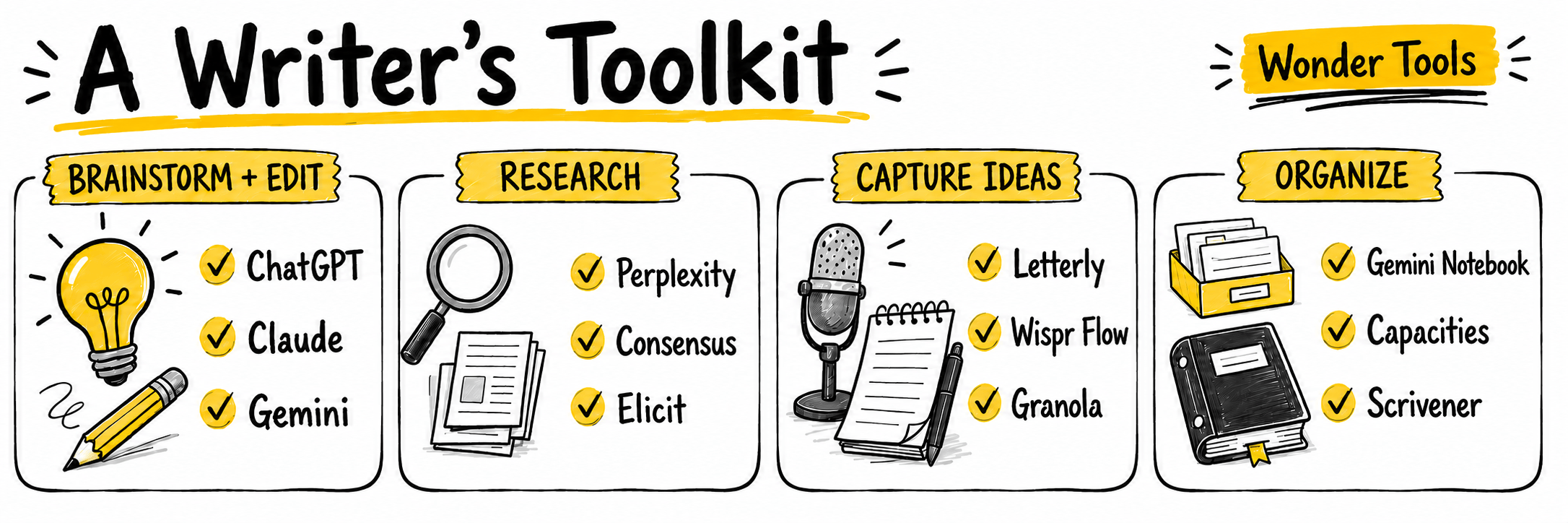
My friend and colleague Mallary Tenore Tarpley writes an excellent newsletter, Write at the Edge, with helpful writing tips and best practices. She’s a professor, journalist, and author who has written for The New York Times, The Washington Post, and other outlets. She recently published an important debut book, Slip: Life in the Middle of Eating Disorder Recovery.
Mallary recently interviewed me about writing tools. She wrote up a summary of our conversation, highlighting the tools I talked about. I’m turning the rest of this post over to her summary.
Mallary Tenore Tarpley: What tools are out there, and how might I and other authors use them to organize our materials and make our processes more efficient? I decided to reach out to Jeremy Caplan for answers. We met in 2010 through our work at The Poynter Institute, and we’ve stayed in touch ever since.
On Substack Live we chatted about a variety of tools that writers and authors can use to make their workflows more organized and efficient. I don't believe writers should ever use AI to do their writing for them, but AI tools can help with related tasks, including research, timeline creation, notetaking during interviews, and more. Watch the full recording here, and get a breakdown of the tools below.

Pick, stick and dig
During the Substack Live, Caplan recommended that writers “pick, stick, and dig.” In other words, pick one or two tools, stick with them, and then dig into them to better understand how they can help you. The number of tools can feel overwhelming at first, which is why Caplan recommends starting small rather than trying everything at once.
Swiss Army Knife tools
He noted four “Swiss Army Knife tools” that are great starting points for beginners: ChatGPT, Claude, Gemini, and NotebookLM (now called Gemini Notebook). These tools, and others, are continuously improving. “A lot of people base their impressions of AI tools based on something they did a couple of years ago,” Caplan said. “And we are at a world of difference at this point.”
With that in mind, Caplan recommended checking out the following tools, not to write for us, but to help improve our processes:
ChatGPT, Claude, and Gemini
For brainstorming and challenging ideas:
These tools are sometimes criticized for their sycophancy; they tend to be flattering and can reinforce a user’s biases. But when prompted, they can also point out areas for improvement.
“If you choose to use AI to challenge yourself, to identify your blind spots, to identify assumptions you’ve made that are baked into a piece of writing that you’re working on, or an argument you’re making, or an outline you’ve set up — if you do that, AI will often, in my experience, point you to things you haven’t thought about enough or that you haven’t noticed or you haven’t realized,” Caplan said. “In some cases, if we’re not using AI to challenge our work or to expand the way we’re thinking about something, we’re missing an opportunity and letting ourselves off the hook in terms of not aspiring to improve our work as much as we could.”
He suggested asking these tools questions along the lines of: Which parts of this piece might lose readers’ attention? Which parts lack a stat, fact, or evidence? Are there any parts where I need to provide more information to support my arguments? What questions would a reader be asking that I haven’t yet answered?
The tool will provide answers and will suggest other ways it can help (including writing or rewriting passages). The key for authors, of course, is making sure we use the tools in ways that let us preserve our own writing and voices. As I’ve written before: “When people use ChatGPT to do their writing for them, it can start to sound like everyone’s singing in the same choir. There’s harmony, but there’s no memorable originality.”
For deep research
These three tools can generate thorough research reports for authors and journalists working on big projects. “As opposed to a simple … Google search that just returns a quick summary and a list of results, a deep research report can be 10, 20, even 40 or 50 pages in length,” Caplan said. “So these are really exhaustive reports.” (For more, see the Wonder Tools post on deep research.)
Caplan suggests that writers be specific about the parameters they’re looking for, with regard to time periods, the kinds of sources you’re looking for (e.g. peer-reviewed articles), and the formats you’re looking for (bullets, quotes, data sets, etc.) Occasionally, the reports may include hallucinated links or sources, so double-check the information.
For organizing information from different sources
Caplan said writers can put various documents (Google Docs, photos, PDFs, etc.) into ChatGPT, Claude, and Gemini, and ask them to surface relevant information. “You can basically say, ‘I have these five documents with my notes from these past five years. Find me the ones about XYZ that are concise and clear,’” he said.
It’s worth trying out, especially if your approach to organizing materials isn’t working as well as you’d like. “I think the way people collect and organize their digital materials is a very personal thing,” Caplan said. “If your system is working for you, that’s great; you don’t need to do anything that’s different … But if you’re like most other people I encounter, you may have leaks in your system.”
For discovering new tools and learning how to use them
I recently used ChatGPT to inquire about digital tools for creating timelines. It introduced me to several options, including Aeon Timeline, Miro, and TimelineJS, built by Northwestern University’s Knight Lab. I then asked ChatGPT to explain how they worked and which seemed best suited to my needs. I was impressed by the results (but I’m probably still going to stick with my butcher paper approach)!
(Here’s a Wonder Tools post about the best timeline tools)
For copy editing
ChatGPT, Claude, and Gemini can offer copy editing help, which may be particularly helpful for independent writers who aren’t working alongside a full-time editor.
“AI can give you all these suggestions, and if you don’t find them useful you can just say, ‘No thanks, give me something else, give me a different suggestion, give me a different weakness I can address,’” Caplan said. “In my experience, almost always one of them or several of them are worth addressing.”
I personally wouldn't advise writers to put their work into AI when writing for another publication that isn't their own, as some publishers have rules and restrictions around this. And some writers choose to avoid AI for copy editing altogether, even when writing for their own publications.
For more, be sure to watch the end of the Substack Live video for more details about privacy, copyright, and ethical concerns related to sharing your copy with these tools (a huge topic that deserves its own series of Substack Lives). Caplan mentioned Jan and Msty as part of this discussion, as well as Pangram, which helps determine whether text may have been generated by AI.
Related recent Wonder Tools posts: Gemini, Explained | Claude Turns Ideas Into Apps | Private AI
NotebookLM (Now called Gemini Notebook)
After hearing Caplan talk about this tool, I came away thinking it could be a really helpful resource for writers, speakers, and educators. NotebookLM lets you upload a variety of materials: PDFs, Google Docs, articles, interview transcripts, notes, websites, book excerpts, etc. and helps you work across your research collection. It can generate infographics, slides, data tables, and more based on the information you give it (a great perk for authors giving talks related to their books).
Each notebook you create is divided into three “panels.” The first panel is for uploading your source materials. “You can put 50 different sources into one notebook,” Caplan said, “and you can have 100 different notebooks if you’re working on different projects.”
The second panel is for the query. You can prompt it, for instance, to review all of your materials and generate key points. “Unlike other AI tools — ChatGPT, Claude, etc. — it’s not going to look into the web unless you direct it to do that,” Caplan said. “It’s just going to look at what you have in the notebook. It’s called ‘grounded’; it’s grounded in the materials.”
The third panel is for generating content related to your materials. Again, you wouldn’t use this to generate writing, but you could use it to create infographics, slides, flashcards, video and audio overviews, and more.
Related Wonder Tools post: NotebookLM: The Complete Guide
Perplexity
This is a search tool that provides concise summaries of complex topics.
“What Google did historically was throw these 100 links at you and say, ‘figure it out,’” Caplan said. “What Perplexity says is, ‘Here’s what we’ve found so far — here’s some background information, here are some citations that you might want to check out, here are some citations on a different specific question you were also looking into.’ It just makes the process of gathering and verifying that information a lot more efficient.”
Related Wonder Tools post: Perplexity Update: How I Use AI for Search
Consensus and Elicit
These tools are especially helpful for finding academic citations for deeply reported books or research projects.
Consensus describes itself as an “AI academic search engine for peer-reviewed literature.” It allows you to search millions of professional and academic journals, and it summarizes the results. Elicit works similarly and can conduct literature reviews and organize findings across papers.
Letterly and Wispr Flow
These are voice AI tools that allow you to dictate information, then have it transcribed and summarized. “You can just talk your way through the blank page and get your ideas out,” Caplan said. “These are your own ideas, and AI is helping to transcribe and summarize those for you.” (I can see this being especially helpful for writers like me who tend to email myself notes that all too easily get lost!)
Granola and Model Context Protocol
Simply put, Granola is an AI-powered notepad for meetings. It’s similar to Apple Notes but has the added benefit of being able to transcribe and enhance notes.
Caplan talked about this tool at length in our Substack Live and has written about it too. As he noted in a recent post about Granola: “Most AI note-takers give me only the AI’s version of what happened. Granola shows my own notes alongside the live transcript. I can refer back to either. Knowing I’ll have a thorough record frees me to focus on listening. I can be more present when I don’t have to worry about jotting down each detail.”
He went on to say: “I upgraded to the paid plan ($14/month) so I can give other AI assistants access to my meeting history through the Model Context Protocol. MCP provides a simple way to link Granola to AI tools like Claude and ChatGPT. … I can ask Claude to cross-reference what I’ve talked about in my presentations with what I’ve published. Claude can also help me generate dashboards, spreadsheets, handouts, and reports from material I’ve presented.”
Related Wonder Tools posts: Granola AI | Connect your Tools to AI
Mem, Capacities, and Tana
Mem is a note-taking tool comparable to a digital notebook that remembers details and surfaces them when they’re relevant. Capacities and Tana occupy a similar space and can help writers organize and connect large collections of notes.
“Each of these tools has their own little quirks and slight differences in style, so it becomes a matter of personal preference,” Caplan said.
Scrivener
Authors have long used Scrivener, a great tool for organizing book-length projects. It allows you to see the entire structure of your book all at once and rearrange sections visually.
“A lot of us are visual thinkers, and we like to see things mapped out. John McPhee, one of my writing teachers way back when, used to have snippets of his stories on his office wall and he would say, ‘This would work really well here,’ sometimes with index cards,” Caplan said. “And Scrivener basically gives you a digital version of that. It gives you multiple different visual ways to organize your material, so I think that can be really helpful for people, and it’s fairly easy to use.” He added that Scrivener wasn’t “made for the AI era,” so it doesn’t have AI features baked into it (which may be part of its appeal for some authors).
I love that Caplan mentioned McPhee, who I returned to at the very end of our conversation. I wondered out loud what McPhee, a Pulitzer-winning author and New Yorker staff writer, would think about all these tools we’d been discussing. We talked about how he has been incredibly prolific in his writing career but is also known for having worked slowly.
As McPhee himself once noted: “People say to me, ‘Oh, you’re so prolific’ … God, it doesn’t feel like it — nothing like it. But, you know, you put an ounce in a bucket each day, you get a quart.”
That seems like a good motto to follow, both for writing itself and for the gradual adoption of new digital tools.
What’s a writing tool of particular value to you? Leave a comment 👇
 | A guest post by
|