

Make Your Own Apps 🚀
Glaze: New Vibe Coding for Beginners

Glaze is a new Mac app for making your own software. It’s for vibe coding, meaning you just describe any kind of tool, game, or app you want to create. Glaze builds it. It’s like having a friend who codes and is happy to add whatever small feature you ask for.
How Glaze is Different: Unlike other vibe coding tools, like Lovable, Bolt, Gemini Canvas, Google’s AI Studio, or Claude Artifacts, Glaze creates software that runs locally on your computer, not on the web. That means:
Your apps works offline
Your data stays on your machine
Apps you make benefit from your computer’s file system, keyboard shortcuts, menu bar integration, and background processes. They’re more like real software than the browser apps other vibe coding tools generate.
Platform and Pricing: It’s Mac only for now. It’s free to use with limits, or $20/month for additional credits. Join the waitlist at glaze.app to get an invite.
The Team: Glaze comes from the startup that makes Raycast, my favorite launcher app. (Why it’s so useful.)
The First Apps I Made with Glaze
I began by making tiny apps. Four steps: plan, create, refine, and publish.
Box Breath One-minute meditation breaks. Built in 12 minutes.
A links app for storing URLs I use often, so I can copy them to my clipboard quickly. Built in 10 minutes.
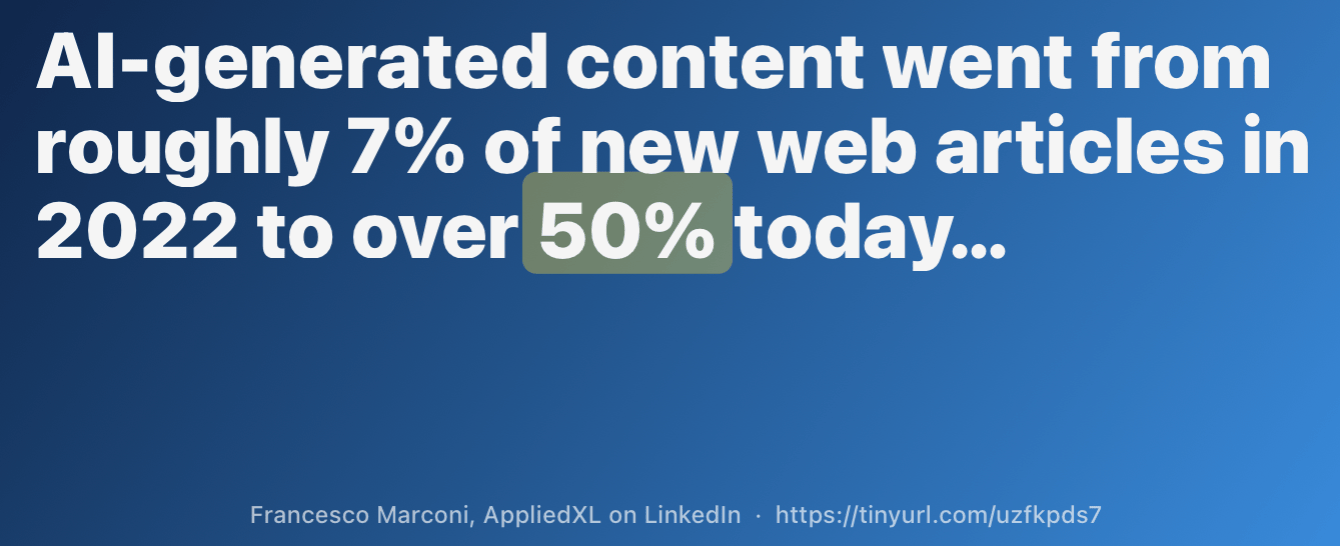
QuotePop, which can turn any text or quote into an image file. I use the images for presentations and social sharing. I can customize the image dimensions, style, and gradient background. Built in an hour.
Here’s an example of QuotePop in action:
Partner Message
Tired of dramatic headlines and emotionally draining news?
The DONUT’s free daily newsletter delivers smart, unbiased news in just a few minutes, with a tone that won’t dampen your morning. Click here to subscribe.
Free Public Glaze Apps I Like
macHealth Identify battery, memory, or other issues impacting your laptop. Quickly find out why your Mac is slow (screenshot). (I also use separate software, CleanMyMac, to diagnose issues, but it takes longer and isn’t free.)
Pinfont Preview text across all your fonts to pick one you like (screenshot)
Focus Soundboard Play sounds together to help you focus (screenshot)
Silly Sounds Press keys to make playful noises. Useful for nothing in particular. 🤪 (screenshot)
Word Connections An offline version of the NY Times game (screenshot)
PDF and Image Merger Combine multiple PDFs and images (screenshot)
How to Get Started
Join the waitlist at glaze.app. When you’re invited, download & install Glaze.
Explore the Glaze “store,” a collection of free apps people have built.
Download and try a few to see what’s possible.
Open Glaze’s planning mode. Explain in detail what kind of app or game you want.
As Glaze prepares your app, it may ask about your feature or design preferences. Answer those questions.
Once you’re happy with Glaze’s plan, which it will summarize for you, tell it to build. Then test the app and ask for improvements.
Keep your app private or publish it to a group or the public store.

Pro Tips
Customize Glaze’s Instructions. Summarize your preferences in Glaze’s settings (screenshot). That way your apps will have your preferred design elements or features.
Include options for your apps. Instruct Glaze to give anyone using your app choices. In my QuotePop app, for example, you can pick your image dimensions, background color, and font.
Plan first. The clearer you are about what you want before Glaze starts building, the fewer credits you’ll burn on rework. Put Glaze in planning mode to start. Or, if you already pay for another AI tool like Claude or ChatGPT, plan there and give Glaze a summary. That saves your Glaze credits for building.
Iterate to improve. Once Glaze builds the first version of your app, give it a list of fixes to improve the app’s design or make it easier to use.
Limitations
Mac only for now. No specific timeline for Windows and Linux.
Credits for complex apps may be costly. More intricate iterations use more credits. If you’re using Glaze for free, you may run out of credits and have to pay for more. If you’re making multiple complex apps, expect to pay $20/month for a subscription, at least while you’re building and refining.
Local only, not mobile. If you use multiple computers, you’ll have to install and use Glaze separately on each. You won’t be able to use your apps on your phone or tablet, as you can with web apps.

Alternatives
Lovable lets you create sites and apps with no code. Start with a text prompt, attach a screenshot of something you like, or build on the template gallery | Pricing | Example: Color Drenching, an exploration of the interior design trend.
Bolt also lets you make a web app or landing page with AI prompts. You can use your brand guidelines to match company designs. | Pricing | Example: I mocked up a landing page design for Amazing Animal Tales.
Claude Artifacts works well for quick interactives like flashcards, quizzes, calculators, mini-games, and simple visualizations. Unlike Glaze, Claude Artifacts and the other alternatives noted here don’t create local software that lives on your computer. Examples: my flashcard maker and a 60-second breathing app. Free. For more, see my full guide to Claude Artifacts.
Gemini Canvas is easy to use for building apps, games, dashboards, or interactive infographics inside Gemini. Feed in a document to have Canvas design an app around it. Make a quiz game from your vocabulary list, or a dashboard from your metrics file. Free. Example: my simple alt-text generator (which I used for this post) works for five images at a time. | My guide to Gemini |
Google has several other good free options. Each has useful templates to help get you started. AI Studio (video) is its most powerful, though the interface can be intimidating for beginners. Stitch lets you vibe code mobile app designs. And you can guide Opal (video) to design Web apps by linking together various skills and steps (screenshot).
Glaze looks similar to Wabi (https://wabi.ai/) ..will give it a try. The key appeal seems to be that you can build local apps on your machine that access local data.
this is pretty interesting...two questions (if you know).
does the app interface with say your GitHub account if you want to put them up there?
Do you always need the app/subscription for access the programs--or could you create a bunch of apps over 3 months and walk away with the apps still secured on your computer?